

Is presence broken now?
by L Veneris, with love, on 2026-09-02
If you’ve read any of the Presence v2 proposals, you may have noticed they begin by discussing the state of presence as it is in the Matrix protocol today. Rather shocking stuff, I know. What you may not know, however, is just how big of a deal these problems — and our solutions to them — actually are. In this post, we’ll take a brief journey through the situation the Presence v2 initiative is up against, and how effective implementing MSC4532: Revised Social Presence in particular might be.
Like the ones you unwrap?
Before we begin, you may want a refresher on the details of presence in Matrix, or perhaps in general. You may skip ahead if you’re confident in the subject. Otherwise, depending on your social platforms of choice, it is likely you already have some experience of presence.
Presence information can be found almost anywhere direct messaging can. Your favourite programs may tell you when your friend is available, or when they were last available, or that Emily is away, and they may even allow you to set status messages to let others know what you’re up to. All of these are examples of presence, named for their purpose of letting users of a social service know whether each other are available to talk or what they might be doing.
Within Matrix specifically, presence currently has a few components you need to be aware of:
presencelets other users know whether you’re online or offlinelast_active_agolets other users know when you last engaged with the network, which is typically when you last sent a messagecurrently_activelets other users know whether you’re engaged with the network at the moment, and it is used to avoid having to updatelast_active_agoconstantly while you are activestatus_msgis a field you set yourself to let other users know, for example, what you’re working on or listening to
These come together to represent all of the aforementioned kinds of presence information.
How bad can it possibly be?
Let’s see!
Observe Figures 1 through 3, containing various runtime statistics gathered from a Matrix server with 2 users. Can you guess when presence was enabled?
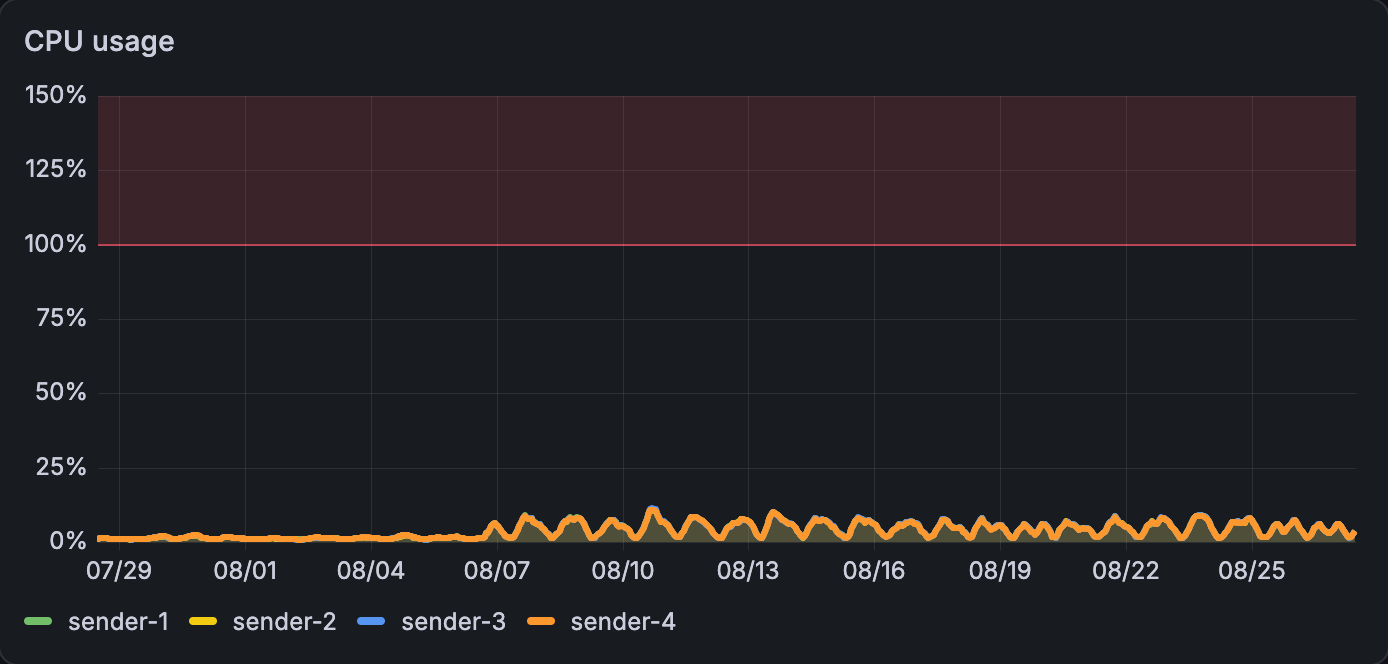
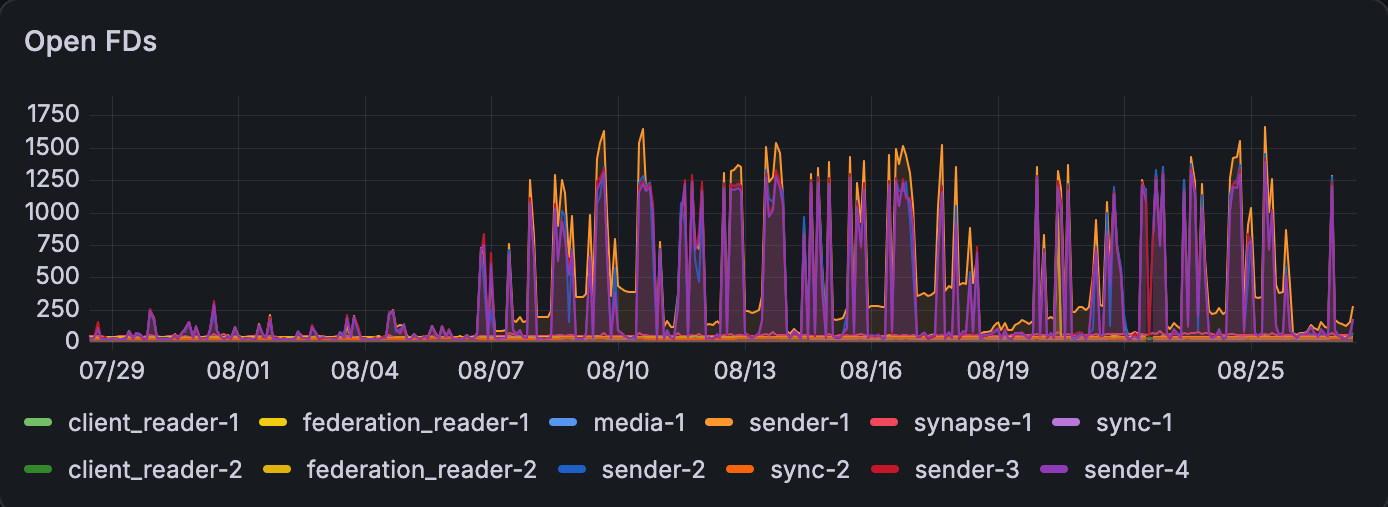
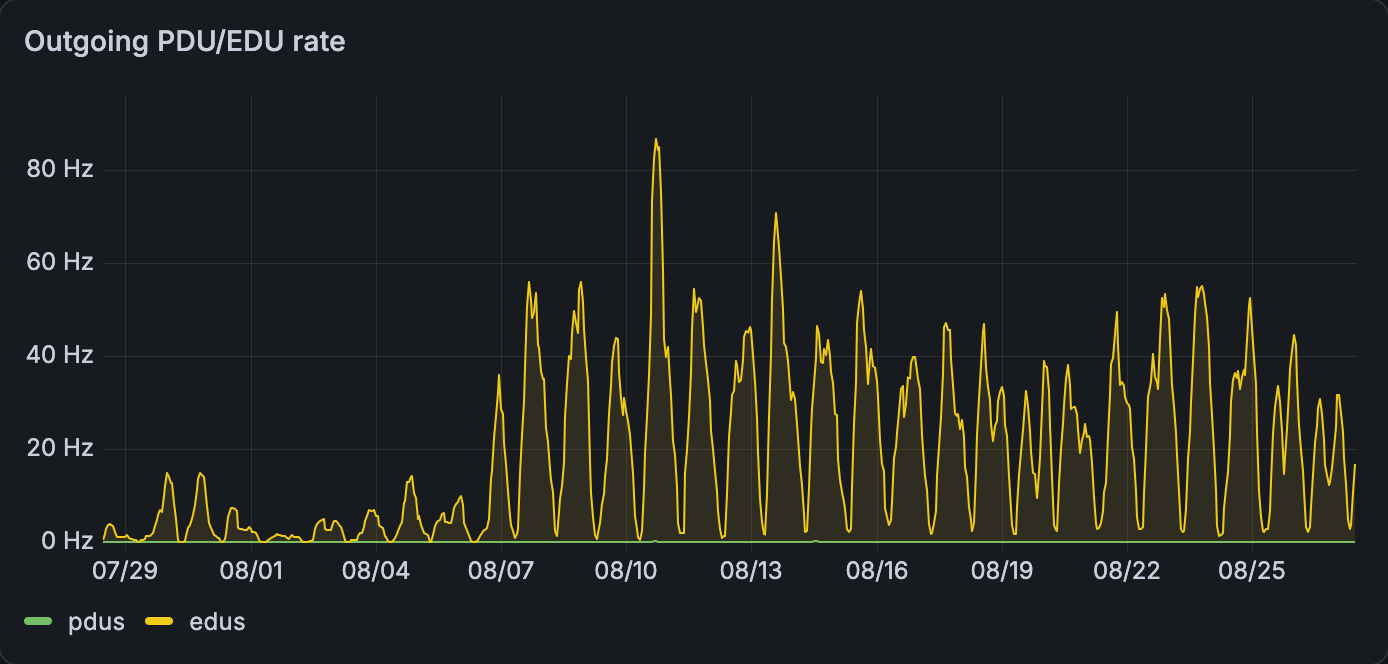
If you said the 7th of August (or the 8th of July if the date format snuck past you), congratulations. If you remain unconvinced, observe Figure 4, showing the updates sent by the same server after one user sent a single message.
All of these metrics together indicate an increase in the work the server is doing to share information with other servers. Presence, as it is now, can quickly become overwhelming to servers of any size. If 2 users show up on the graphs, imagine the costs incurred to resource-constrained or larger instances.
In numbers
While visuals are fun, we’re here for data. For today’s assignment, we have 313,553 federated presence updates to look at, all collected over the course of a few days. If you prefer independent work, fear not; there’ll be a section at the end of this post with guidance on collecting a presence dataset with Caddy and using our tool to process it.
Our processed dataset gives us the following information, showing which fields were changed compared to the previous presence update in the sequence and how many occurrences of that pattern there were.
| Updated fields | Quantity | Proportion of total |
|---|---|---|
currently_active |
0 | 0.00% |
presence, status_msg |
0 | 0.00% |
status_msg, currently_active |
0 | 0.00% |
presence, status_msg, currently_active |
0 | 0.00% |
status_msg |
2 | 0.00% |
presence, currently_active |
9 | 0.00% |
last_active_ago, status_msg, currently_active |
10 | 0.00% |
last_active_ago, presence, status_msg |
13 | 0.00% |
presence |
15 | 0.00% |
| (empty) | 343 | 0.11% |
last_active_ago, status_msg |
618 | 0.20% |
last_active_ago, currently_active |
1716 | 0.55% |
last_active_ago, presence, status_msg, currently_active |
2047 | 0.65% |
last_active_ago, presence |
31761 | 10.13% |
last_active_ago, presence, currently_active |
99038 | 31.59% |
last_active_ago |
177981 | 56.76% |
Before we begin, it is worth mentioning how this system is supposed to work. When a user is not active,
currently_active should be turned off, and last_active_ago is updated to how many milliseconds ago the user changed
their presence state or interacted with a room. When a user is active, currently_active should be turned on so
last_active_ago no longer has to be updated. In practice, these behaviours are bugged in many implementations,
including a long-standing bug that causes one implementation to ship malformed presence updates out to the masses. The
several years these bugs have been left untouched for is a strong indication of the dust accumulating on the presence
module of the specification.
With that in mind, what does the data tell us? We can see a few things:
- 56% of these updates only happen to tell other servers exactly when a user last did something. This is a privacy concern, even aside from the implications of most presence updates not updating someone’s presence.
- Only 133,513 (42%) of these updates actually update presence information (one’s state or status message).
- Status messages are even less popular, only being set in 8521 (0.27%) updates, while they are a widely used feature on other platforms that feature them. This reflects on the poor adoption of presence features in clients due to their overall neglect.
Won’t somebody help us?
I’m glad you asked. Now we’ve seen the state of presence in the wild, how about we see what Revised Social
Presence could do for us? The most relevant changes here are the removal of last_active_ago and
currently_active, which leaves us just with the user’s actual state. Let’s apply these changes to get an idea.
| Updated fields | Quantity | Proportion of total |
|---|---|---|
status_msg |
630 | 0.2% |
presence, status_msg |
2060 | 0.66% |
presence |
130823 | 41.72% |
| (empty) | 180040 | 57.42% |
Now we’ve simplified the system to remove opportunities for broken behaviour in currently_active and
last_active_ago, can we go further? Revised Social Presence removes the need for timed rebroadcasting altogether, so
we can remove the last row of unchanged information.
| Updated fields | Quantity | Proportion of total |
|---|---|---|
status_msg |
630 | 0.47% |
presence, status_msg |
2060 | 1.54% |
presence |
130823 | 97.99% |
All presence updates now contain actual presence information, as they are intended to, and we’ve dropped more than half (57%) of the traffic in the process. You may be wondering at this point if this comes at the cost of any information; surely dropping half of all broadcasts entails removing features. I am delighted to inform you it does not. Aside from the disconcerting millisecond-accuracy data on when you last sent a message, which is now simply based on when you last appeared to be online, the system conveys all the same information as before. In fact, it manages to make these improvements while adding a busy state and making statuses extendable for future developments.
What have we done?
Finally, note that all of these changes apply to a remainder. MSC4495: Selective Presence will drastically reduce the amount of uninterested parties receiving presence in the first place. Choosing between letting the whole world know your business and nobody at all is simply not practical, so the added fidelity grants more privacy for users and lower compute costs for server operators. Everyone is a winner on this fine evening.
In conclusion, Revised Social Presence, as a counterpart to Selective Presence, is estimated to reduce the federation burden of the presence left standing by more than 50% in update volume. We can achieve all of this while not only transmitting the same information, but adding a busy state so you can let people know when you’re unavailable, improving the privacy of last seen timers without compromising user experience, and other goodies you can find in the proposal.
Thank you for reading, and we hope you’ll experience the benefits of this work soon enough.
Can I see for myself?
This guide uses Caddy to obtain Matrix federation transaction logs and process them, but you may adapt this setup for your preferred reverse proxy.
In the Caddy server block that reverse proxies traffic to your Matrix server, add the following log configuration.
matrix.example.tld {
    log {
        output file /var/log/caddy/presence.log {
            roll_size 512MiB
            roll_keep 5
            roll_keep_for 14d
        }
        format filter {
            request>headers delete
            request>tls delete
            bytes_read delete
            resp_headers delete
            user_id delete
        }
    }

    log_append req_body {http.request.body}
    log_append resp_body {http.response.body}

    @notsync not path /_matrix/federation/v1/send*
    log_skip @notsync

    # Your other directives and reverse_proxy line
    # ...
}
Now, download our Python library migrations.py, and run the following instructions in a Python
interpreter from the same directory.
>>> import migrations
>>> import pathlib
>>> transactions = migrations.load_caddy(pathlib.Path("presence.log"))
Next, prepare the transactions for analysis by going through the formats in order.
Format 0 is the base for processed logs, grouping all transactions by their origin servers and deduplicating them.
>>> transactions = migrations.caddy_to_0(transactions)
Format 1 takes this a step further, flattening out the transactions into sequences of individual presence updates grouped by origin server and user.
>>> transactions = migrations.apply_1(transactions)
Finally, Format 2 converts the grouped sequence of presence updates for a given user into a series of differences, containing only the information that changed since the last update.
>>> transactions = migrations.apply_2(transactions)
The final schema of this data is as follows.
{
    "<server-name-uuid>": {
        "<user-uuid>": [
            {
                "edu": [
                    ["<property-name>", "<value>"],
                    // example: ["presence", "online"]
                    // ...
                ],
                "origin_server_ts": 0,
                "received_ts": 0,
                "request_uuid": "<request-uuid>"
            }
        ]
    }
}
Now, you may run the available analyses:
migrations.delta_combination_prevalence(transactions)produces the tables seen in the previous section, showing each combination of updated fields in the Format 2 transactions and how common that combination ismigrations.containing_presence(transactions)produces the figures on the proportion of all the Format 2 transactions given that contain core presence information, showing how many state or status updates occur in the collectionmigrations.containing_status(transactions)does the same ascontaining_presence, but exclusively for status messages
Our own dataset is available for download as a prepared collection of Format 1 transactions, in case you would like to check the results featured in this post.
-
This number does not occur in the table because the dataset has to account for entries that are assumed to be unset when the stream starts. This means the first update of every user’s presence stream will contain all four fields, for the purpose of calculating the differences between each update and the next update. You may verify it independently as seen in the guide. ↩